It researches, then asks
The planner reads your repo read-only and interrogates a vague goal instead of guessing at it. Its final message is the plan: ordered tasks, each carrying a runner, model, thinking effort and mode.

Apache-2.0 · Claude Code · Codex · OpenCode
The planner reads your repo, asks about whatever you left vague, and hands back tasks you can rewrite — prompts, models, modes, dependencies, all of it. Then it runs one real coding-agent session per task, and completes a task only when that task's marker shows up in the output.
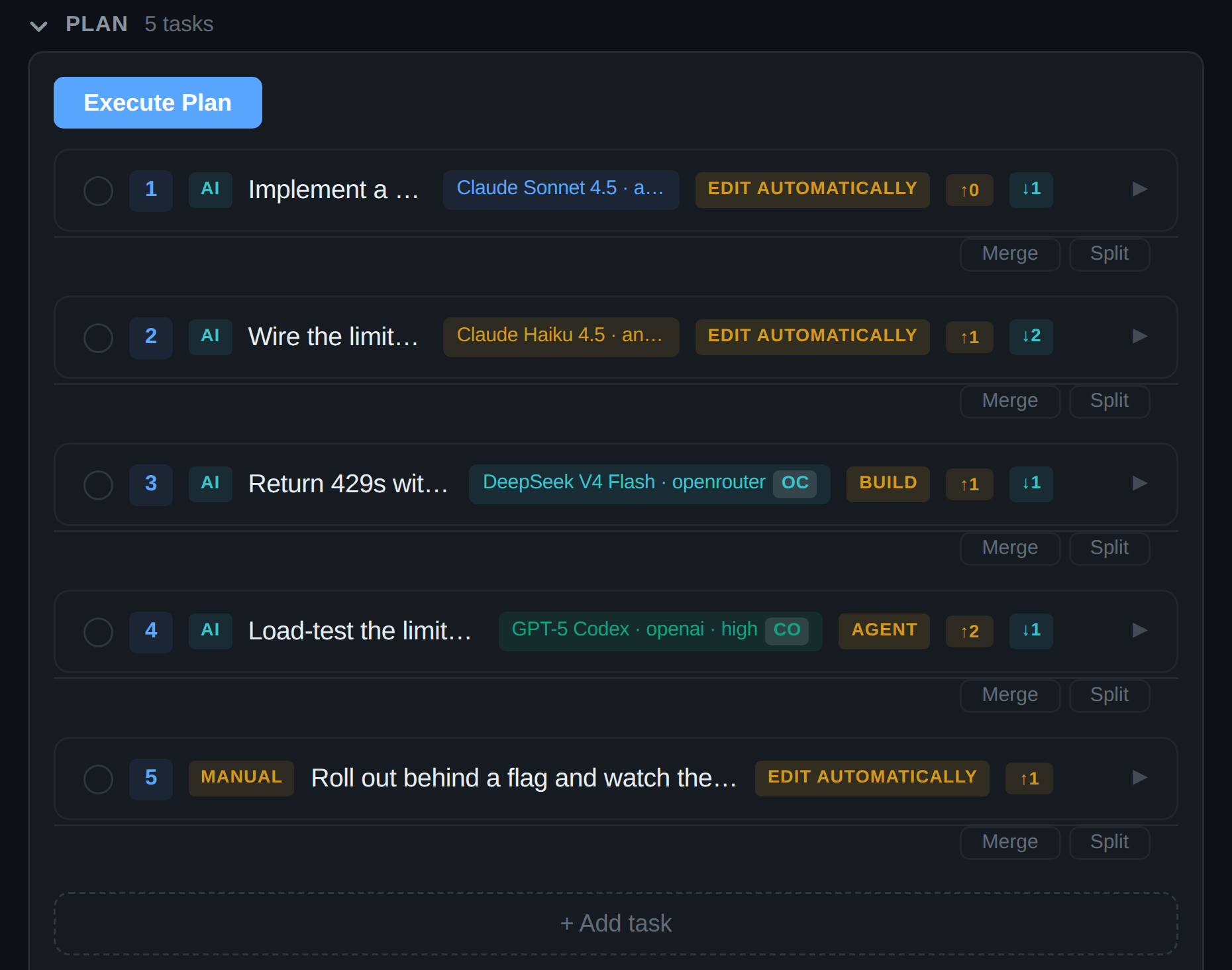
Plan · 5 tasks
How it works
It's a typed artifact you can rewrite. Everything else follows from that.
The planner reads your repo read-only and interrogates a vague goal instead of guessing at it. Its final message is the plan: ordered tasks, each carrying a runner, model, thinking effort and mode.
Every AI task spawns an actual coding-agent session in a fresh context, handed its predecessors' results. Independent tasks run in parallel. The dependency graph is always respected.
A task completes when its unique completion marker appears in the runner's output. Exit code is kept as evidence. The model never gets a vote in its own verdict.
VS Code extension
The panel docks beside your code and streams the whole loop: live thinking, every research step with its outcome, and the plan itself — pinned where you are already typing instead of buried in scroll.

Change a task's runner and its model, thinking effort and mode re-derive from that runner's own catalog. One piece of code does it for every surface, so an assignment the runner cannot spawn never gets saved.

The picker is scoped to the selected backend's real catalog, so you never type an id that turns into a failure at spawn time.

The levels offered are the ones that model actually has. A docs task doesn't need to think as hard as a migration, and you decide which is which.

Grill-me interrogates a vague goal before outlining. PRD drafts one and waits for your sign-off. TDD rewrites every task around red-green-refactor.

Claude Code, Codex or OpenCode can be the planner — read-only by construction, no extra API key. An agent that isn't on your PATH is greyed out rather than offered and then failed.

A task can pause and hand the decision back to you with the evidence it gathered attached. Approve and it continues. Reject and it doesn't.
Research steps settle one at a time. The planner asks its question and waits. The plan commits with per-task pills, execution starts, and a task lands on a green verdict that names the evidence which produced it.
The plan stays docked between the transcript and the input — where you are already looking when you type a change to it — instead of scrolling away as a chat message.

Terminal UI
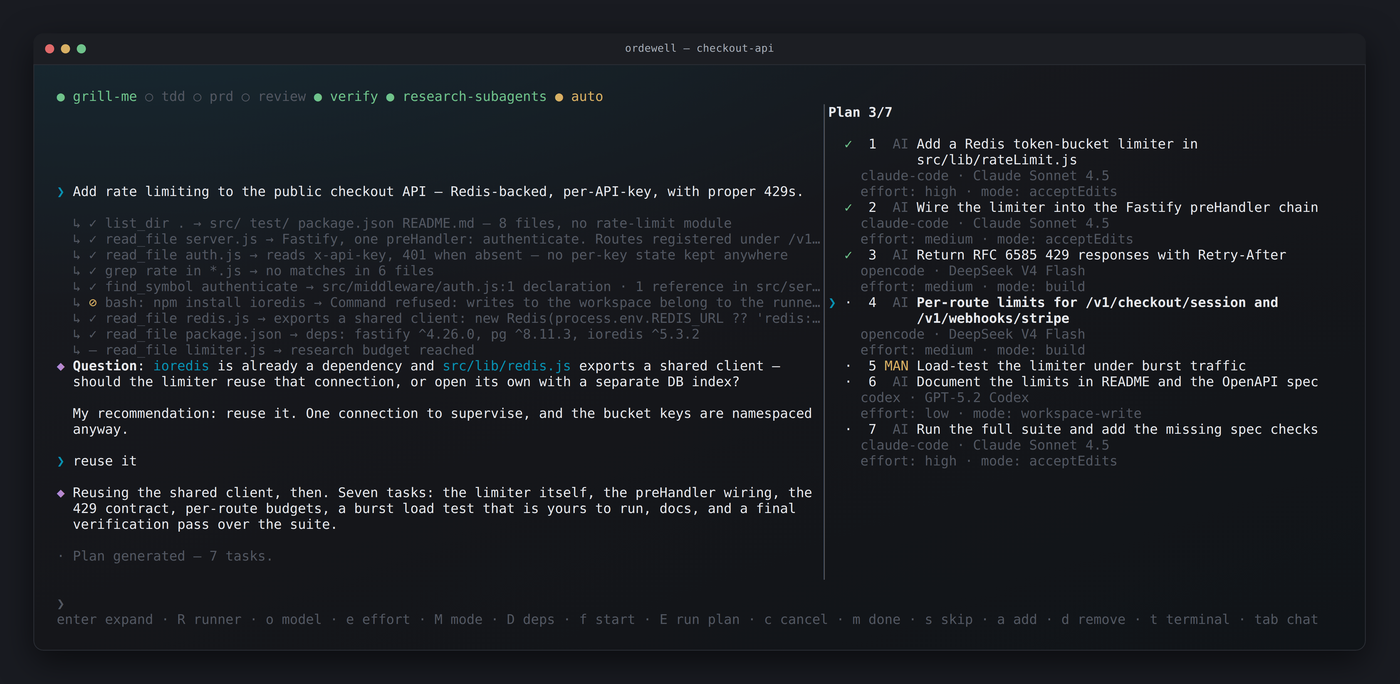
Conversation on the left, live plan on the right. Single keys drive the whole thing: no menus, no mouse, nothing that needs a window server.
/help lists the rest. Each task's live terminal is tmux-backed, so the TUI
wants tmux installed on every platform — and on Windows, WSL.
Why it holds up
Change any prompt, model, effort or mode. Add tasks, delete them, rewire dependencies. No round-trip to the AI, and completed work survives every edit.
A security refactor and a README update don't deserve the same model. The planner makes one portfolio call across the whole plan — and shows you all of it before anything runs.
Exit code and completion marker. That is the entire input. A run that ends without its marker fails loudly instead of passing quietly.
Reads run in parallel and silently. Anything reaching outside the workspace asks once. Commands that write are refused outright — mutation belongs to the runners.
Claude Code, Codex and OpenCode ship built-in. Anything else — Aider, your own CLI
— is a JSON manifest with {{variable}} templating, not a pull request.
Every slash command has an identical CLI subcommand, held there by a parity test. Whatever a human can reach from the panel, a script can reach from a pipeline.
CLI
$ ordewell plan --goal "Add rate limiting to the public API"

Generating plan for: "Add rate limiting to the public API"...
✓ list_dir src → D middleware  F router.ts  F auth.ts
✓ grep X-RateLimit → no matches in 6 files

Question: should limits apply per API key, or per client IP?
My recommendation: per key — auth() already threads the key through req.ctx.
> per key, with an IP fallback for anonymous routes

Plan: 4 tasks (3 AI, 1 Manual) — claude-code, opencode

   1. [ AI] Add a token-bucket limiter in src/middleware/rateLimit.ts (Claude Sonnet 4.5 · Claude Code)
   2. [ AI] Wire the limiter into route registration (Claude Haiku 4.5 · Claude Code)
   3. [ AI] Return RFC 6585 429s with Retry-After (DeepSeek V4 Flash · Opencode)
   4. [MAN] Document the limit headers in the OpenAPI spec

$ ordewell run
✓ #a1b2 completed — PASS: completion marker detected in agent output
⟳ #c3d4 in_progress — claude-code / claude-haiku-4-5

Done. 4 completed, 0 failed, 0 blocked.
Get started
No key to export and no config file to write. Ordewell finds the coding agents already on your machine, and the planner, the runners and any API key are set from inside the app — not from your shell profile.
Terminal
npm install -g ordewell
ordewell   # chat left, plan right
ordewell with no arguments is the TUI. Its opening screen shows
the planner and the runners it found, and both change in place —
/planner, /runners, /key — with no restart.
npx ordewell does the same without installing.
VS Code
code --install-extension ordewell.ordewellOr search Ordewell in the Extensions view. It carries its own core, so there is nothing to install from npm: open a folder, open the panel, and set the planner and runners in the settings bar.
Get it on the Marketplace →/key later if you
want one instead.
Every slash command is also a subcommand, so nothing is UI-only. One environment variable is enough to skip the interface entirely.
# plan on an agent you already have — no API key
export AI_PROVIDER="claude-code"        # or codex, or opencode

ordewell plan --goal "Add rate limiting to the public API"
ordewell run
Prefer a key? Twenty-five providers are recognised from their own
*_API_KEY — OpenRouter, Anthropic, OpenAI, Gemini, xAI, Groq, DeepSeek and
more — plus any OpenAI-compatible endpoint, including a local one.
ordewell key lists them; ordewell web starts the HTTP and
WebSocket API on port 3742. Same core behind all four surfaces.
Open source, Apache-2.0, and the plan is yours to rewrite.