Say what you want
Ordewell reads your repo and asks about anything you left open.

Apache 2.0 · Claude Code · Codex · OpenCode
It runs Claude Code, Codex and OpenCode for you, in plain sight, and nothing runs until you approve.
npx ordewellDescribe what you want built. Ordewell reads your repo, asks about anything left vague, and returns a plan of tasks you can edit. Build tasks wait for your approval. Each change works on its own branch, and you read the diff before you merge.
Ordewell reads your repo and asks about anything you left open.
Change any task, agent or model before anything runs.
Change tasks work side by side on their own branches. Yours waits for you.
How it works
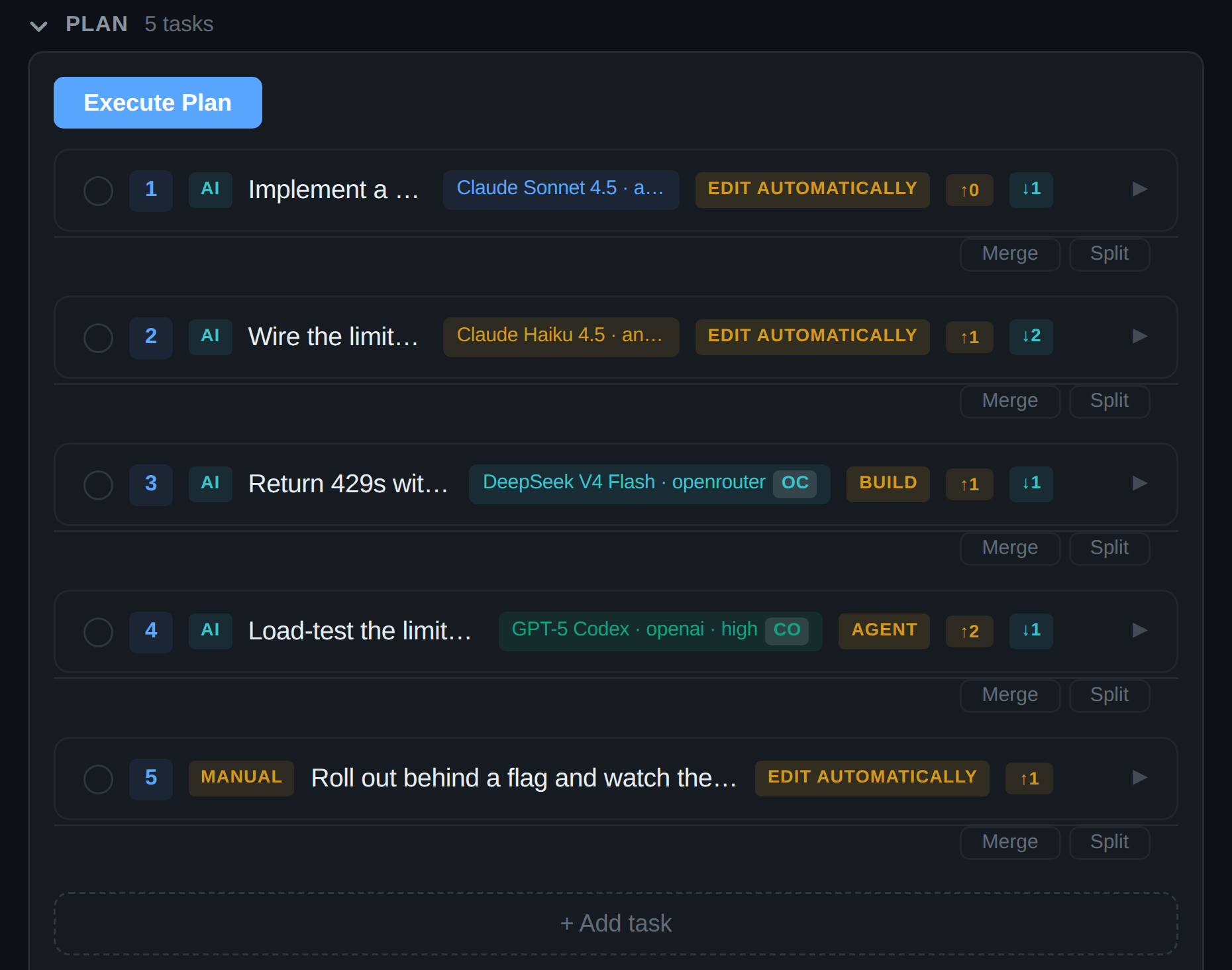
Every task is written out with the agent, model and effort that will run it. You can change any of it first.
The planner reads your repo without changing it, asks about anything unclear, and writes the plan: ordered tasks, each naming the agent and model that will run it.
Each change task gets its own branch and worktree. Independent tasks run at the same time. A dependent task waits until its inputs are on the run's integration branch.
A task is done when its agent reports completion through Ordewell's own tools, or when a script's exit status says so. No second model judges the work. A task that never reports fails where you can see it.
Why it's different
The plan is yours to rewrite before anything builds: prompts, agent, model, effort, mode and dependencies.
No second model is asked whether the work looks done. The agent's own completion report decides, and a script's exit status decides for scripts.
Claude Code, Codex and OpenCode can share a plan. Each task picks its agent, model, effort and mode, and a task can move to another agent.
A task that hits its agent's usage limit pauses. Claude Code and Codex name the reset, and the task continues in its saved session then, while Ordewell is running. After a restart it waits for you. OpenCode names no reset, so its tasks wait for you. Move a paused task to another agent and its unfinished work comes with it.
VS Code extension
Live thinking, every research step, and the plan itself, pinned above the composer.
Install
code --install-extension ordewell.ordewellOr search Ordewell in the Extensions view, or open the Marketplace listing. In Cursor, Windsurf or VSCodium, get it from Open VSX. The extension bundles its own core, so there is nothing to install from npm.
First run
With Claude Code, Codex or OpenCode installed, the first usable one plans for you, read only, with no API key.
Watch a real run in VS Code, 42 seconds: a goal becomes a plan, three tasks run at once, and the supervisor reports back. Sped up where marked. Recorded on October 20, 2026 with Ordewell 0.10.10.
Terminal UI
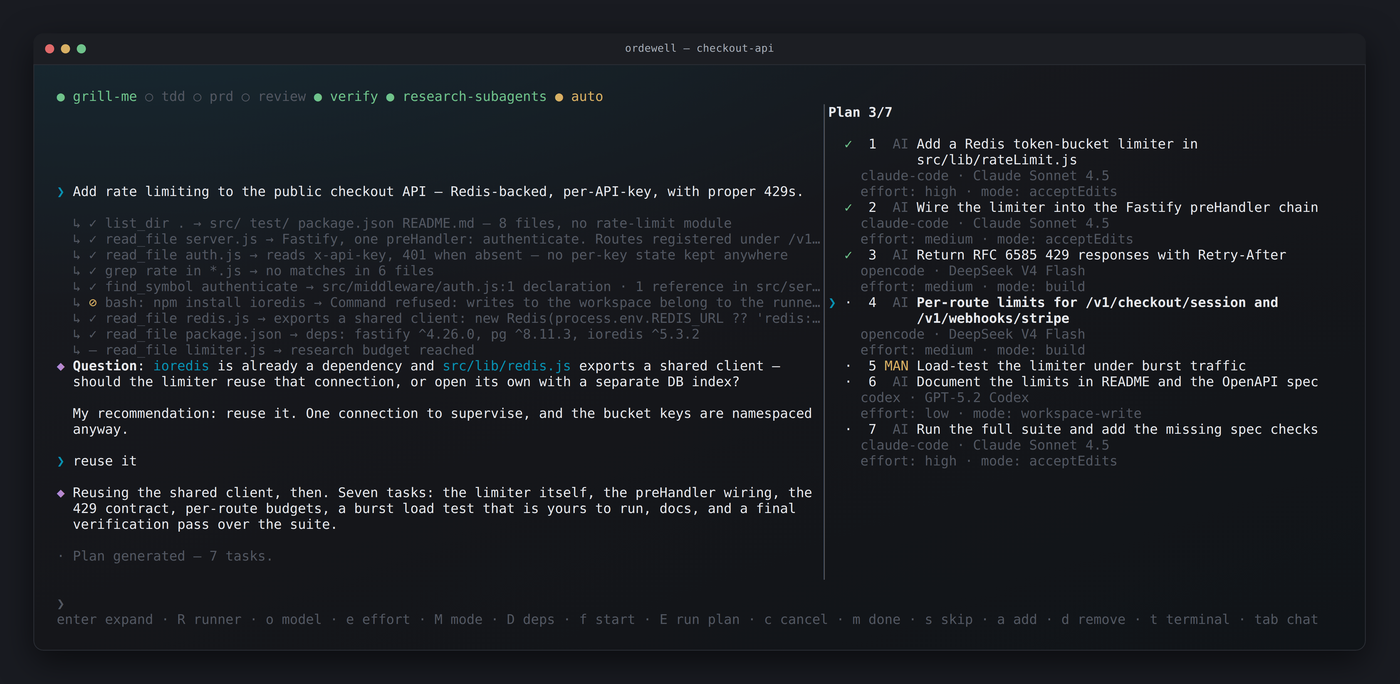
Conversation on the left, live plan on the right. Single keys drive the plan: no menus, no mouse.
Install
npm install -g ordewell
ordewell   # in your project
npx ordewell runs it without installing. Needs Node.js 20.3 or newer. On
Windows, run it under WSL.
First run
ordewell. The opening screen names the planner and the runners it found.
An installed coding agent plans by default, with no API key. Change it in place with
/planner and /runners.
CLI
# plan on an agent you already have, no API key
export AI_PROVIDER="claude-code"        # or codex, or opencode

ordewell plan --goal "Add rate limiting to the public API"
ordewell task-model 3 sonnet            # change a task before it runs
ordewell run
ordewell handoff review                 # read the diff first
ordewell handoff merge                  # then bring it onto your branch
Get started
Terminal
npx ordewell
Runs without installing. To keep it, run npm install -g ordewell, then
ordewell in your project.
VS Code
code --install-extension ordewell.ordewellOr search Ordewell in the Extensions view. It bundles its own core, so there is nothing to install from npm.
Get it on the Marketplace →Ordewell is pre-1.0, so minor releases can include breaking changes. Read the changelog before you upgrade.
Read the docs →Open source, Apache 2.0, and the plan is yours to rewrite.