
Ordewell for the terminal · TUI and CLI
The same plan, in your terminal. Over SSH, too.
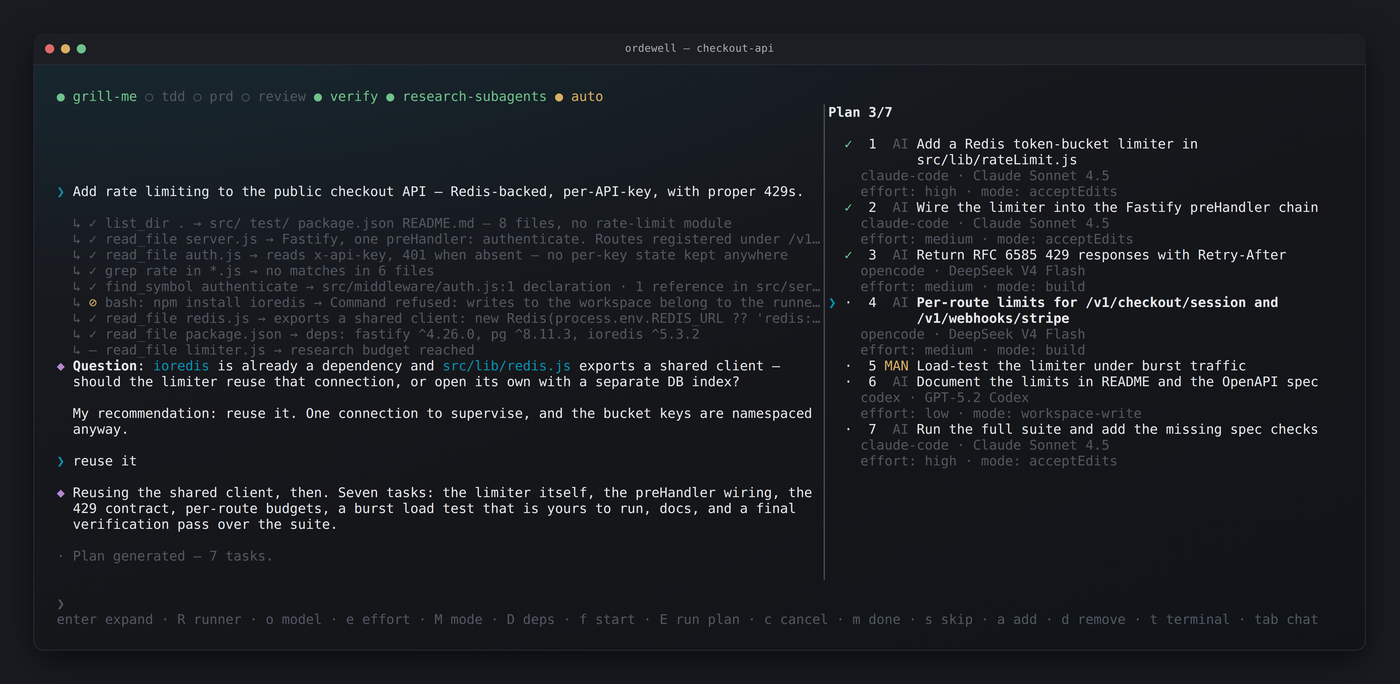
Conversation on the left, live plan on the right. Single keys drive the plan: no menus, no mouse. One binary, and no API key if you already have a coding agent.
Get started
One line, then one goal.
Install
curl -fsSL https://ordewell.ai/install.sh | shbrew install ordewell/tap/ordewellnpm install -g ordewellThe binary needs no Node.js. The npm package needs Node.js 20.3 or newer; mouse and paste on Windows need 22.17.
First run
- Open a project directory in a terminal.
- Run
ordewell. The opening screen names the planner and the runners it found. - Type a goal, then approve the plan, or let autorun start it.
An installed coding agent plans by default, with no API key. Change it in place with
/planner and /runners.
Keys
Single keys drive the plan.
Select a task and change it where it stands: its runner, its model, how it runs. Then start one task, or the whole plan.
- tab swap chat and plan
- f start selected task
- E run the whole plan
- R change runner
- o change model
- M execution mode
Watch
A real run, start to finish.
CLI
For a pipeline instead of a person.
The same plan from a script: plan a goal, change a task, run it, and read the diff before it merges.
# plan on an agent you already have, no API key
export AI_PROVIDER="claude-code"        # or codex, opencode and five more

ordewell plan --goal "Add rate limiting to the public API"
ordewell task-model 3 sonnet            # change a task before it runs
ordewell run
ordewell handoff review                 # read the diff first
ordewell handoff merge                  # then bring it onto your branch
Go further
Set the goal. Let the graph run.
Step in whenever you want, or not at all.
Free and open source. You need one coding agent, installed and signed in: Claude Code, Codex or one of the others.